The app I designed twice — and the clever idea I had to kill.
A personal finance app for Indonesian households. V1 shipped to the Play Store in 2025. After three friends couldn't use it without my help, I rebuilt it — then caught myself making the same mistake again, and started over a second time. V2 is now live on the Play Store.
TOOLSPencil (AI-augmented) · token design system · Nunito
PLATE 01 — DESIGNED TWICE: V1 → V2
V1 · 2025 — FAILED ITS FIRST USER TEST
→
V2 · 2026 — REBUILT, TWICE
LILIST · SHOPPING-LIST + EXPENSE, FOR HOUSEHOLDSFIG. 01
(01)ORIGINFIELD NOTE — 2021
01ORIGIN
A pregnant graphic designer opens Figma for the first time
The first version of Lilist existed in 2021. I was pregnant, about to leave freelance work, and curious about Figma — a tool I'd never touched as a graphic designer.
I designed four frames: onboarding, login, home, and a planning screen. No user flows. No principles. I didn't know what UX even meant. I just wanted an app to help me plan groceries, because I was about to be responsible for a household.
Then my son was born, and Lilist sat in a forgotten Figma file for years.
In early 2025, with our first studio project stalling, I reopened that file. The work was unrecognizably bad — but the problem was still real, and I now had years of life as a household manager to understand it. Lilist became how I taught myself what I'd skipped: how digital products actually get built.
V0 — THE FIRST FOUR FRAMES, 2021
Made during pregnancy — the first time I ever opened Figma. No flows, no principles; I didn't yet know what UX even meant. Built on an old Samsung, so the proportions are rough. The screenshot is left exactly as it was.
(02)WHY THIS PROJECTSCOPE DISCIPLINE
02SCOPE
Why Lilist — and why it shipped when JAKA didn't
Coming back to work in 2024, the first thing I built wasn't Lilist — it was JAKA, a multi-device POS system. JAKA is where I actually learned Figma properly: user flows, components, a real design system. It also taught me, painfully, that ambition without scope discipline doesn't ship. We paused it in early 2025 — and that reset became Sirkala, our two-person studio for lightweight daily apps we could realistically finish.
Lilist almost fell into the same trap — its first idea was far bigger than it looked. That's where I learned the move that mattered:
“Change the solution, not the problem.”
The problem never changed — people overspend on groceries. Only the solution did.
FIRST IDEA — SHELVEDPrice-comparison app
Scan an item · compare prices across stores · find the cheapest nearby.
✕ Needs live price data + retail partnerships — too heavy for two.
→
WHAT WE BUILTShopping list + spending
Plan ahead or just record · track spending · stay aware and in control.
✓ Simple enough for two people to actually finish.
That conviction — that we could shrink an out-of-reach idea into something shippable — is exactly why we paused JAKA and bet on Lilist. It became the one we could actually finish.
(03)V1 — WHAT I SHIPPEDPLAY STORE · NOV 2025
03V1
V1 — what I shipped
V1 launched on the Play Store in November 2025, built around one opinionated flow:
Plan a list→Shop→Log expenses→See report
It was usable — if you used it exactly the way I expected. This was my first end-to-end product cycle, and I learned what “end-to-end” really means: research, wireframes, a design system, hand-off, sprint planning in Jira, Play Store submission, and the strange anticlimax of watching your app go live.
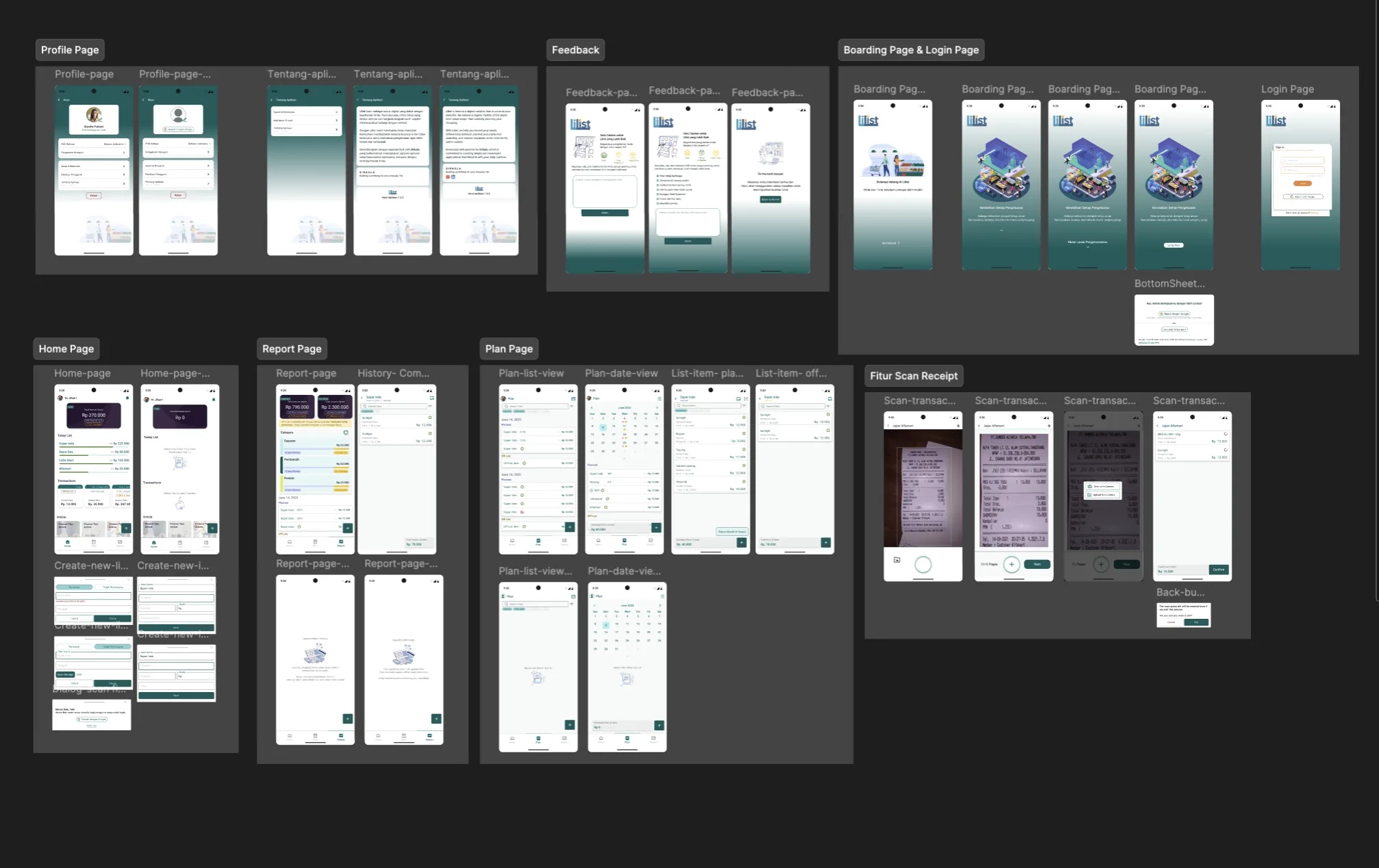
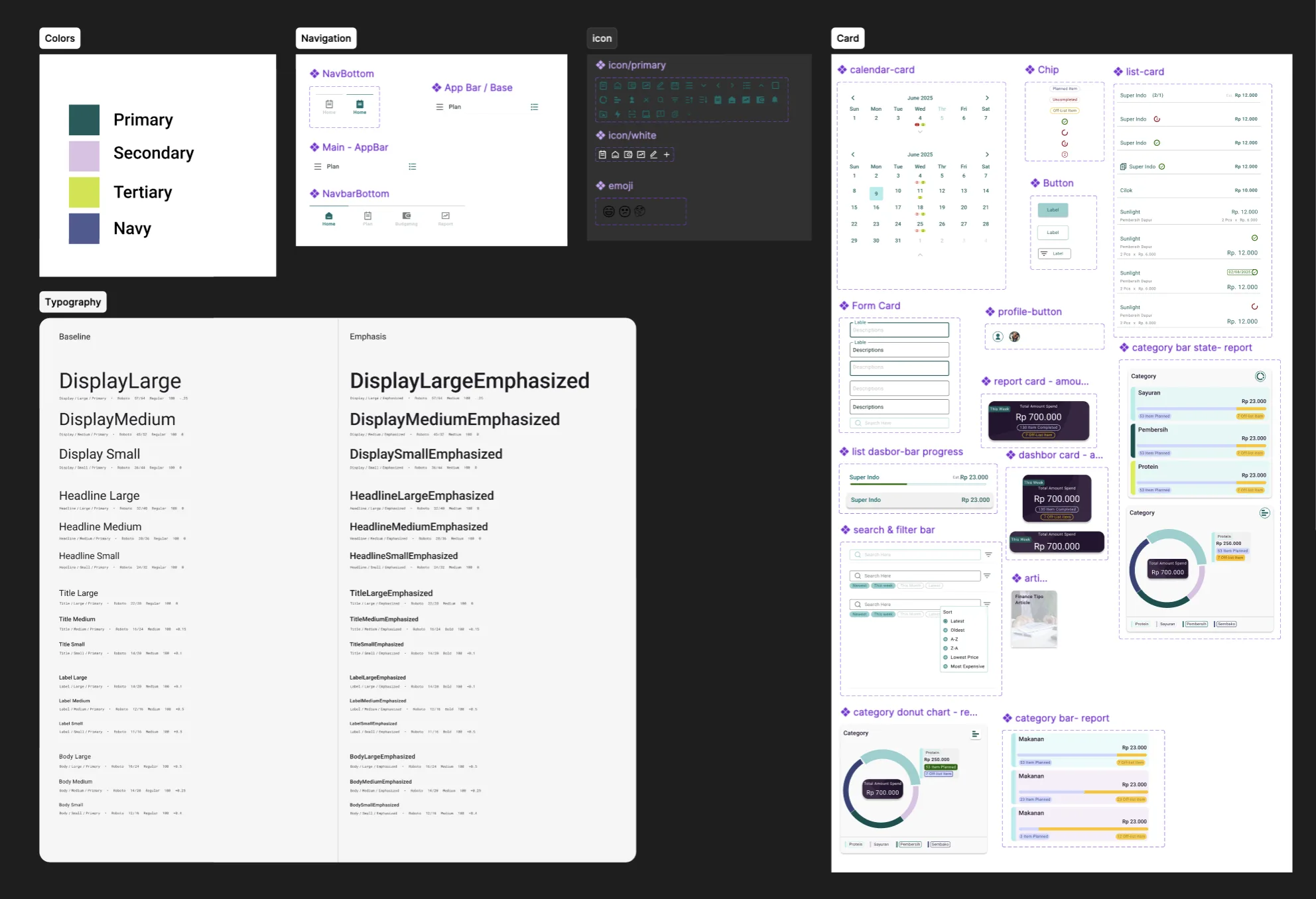
DESIGNED IN FIGMAThe full V1 app in Figma — organized into pages and flows: Home, Plan, Report, Profile, the receipt-scan feature, plus onboarding and login.A token-based design system — color tokens, a Material 3 type scale (baseline + emphasized), and a reusable component library: navigation, cards, charts, search.
I was proud of V1. I was about to find out it didn't work.
(04)USER TESTING — THREE FRIENDSTHE WRONG PERSON
04TESTING
The day I learned I'd designed for the wrong person
I gave V1 to three friends. No introduction beyond “try this shopping list app, tell me what you think.” All three got stuck — not on a button, on the premise.
WHAT THEY EXPECTED
An app to track what I spent on groceries. I open it, log what I bought, done.
WHAT LILIST DEMANDED
First plan a list. Then shop. Then match what you actually bought against what you planned.
“I thought this was a tracker, not a planner.”
— ALL THREE OF THEM, IN DIFFERENT WORDS
I had assumed everyone shops like me — with a list. Most people don't. They walk in, buy what they need, and want to know later if they overspent. My friends weren't wrong. I was.
(05)THE REDESIGN — AND THE IDEA I KILLEDCENTERPIECE
05REDESIGN
The redesign, and the clever idea I had to kill
My first instinct was to serve both kinds of shopper. I sketched two personas — Planners and Budgeters — and built one app with two modes, switched by a single “Planning” toggle.
THE PLANNERS· Make a list first· Want planned vs. actual· Need structure
THE BUDGETERS· Shop spontaneously· Just want to track spending· Want speed
On paper it looked clever. Building it out, I got uncomfortable. To switch modes well, the user first had to know which kind of shopper they were — and declare it. I had removed the forced flow and replaced it with a forced identity. Same original sin, new costume.
✕ THE CLEVER FIX I SCRAPPED — A MODE TOGGLE
WHAT KIND OF SHOPPER ARE YOU?
PlannerBudgeter
✕ SCRAPPED
My first redesign made people declare an identity before they could do anything — the same forced choice, wearing a costume. So I killed the toggle.
My friends never said “I'm a Budgeter.” They said “I just want to log what I bought.”
THE REAL FIX
The problem was never two personas. It was the entry point forcing a behavior before the user did anything — so I killed the choice.
DOOR 01Plan ahead
Make a shopping plan or a bill reminder.
DOOR 02Record after
Snap the receipt or quick-log what you bought; Lilist reads it and quietly matches it to a plan if one exists.
↓ ↓
THE SAME HOME
Beranda — today's plans + recent spending, one glance. No mode, no toggle, no interview.
So V2 makes the list the quiet unit underneath everything, and offers two equally easy ways in. Whichever door you walk through, you land in the same home — the app does the reconciling in the background instead of making the person do it.
WHAT V2 BECAME — 4 TABS, ONE COHERENT PRODUCT
BERANDAHome — today's plans + recent spending, one glance
RENCANAPlan — a forward calendar of shopping plans & bills
BUDGETEnvelope budgeting tied to payday (not a dead date), with savings that accumulate and a no-double-counting withdrawal flow
LAPORANReport — where your money went, framed as awareness, never judgment
PLATE 02 — PHOTO-LED ONBOARDING
V2 opens warm and photo-led — honest about the two ways in: plan ahead, or just record after. No mode, no toggle, no interview, just a friendly welcome into the same home.
LIVE SIMULATORlive · auto-plays 3 slides
PLATE 03 — RECORD AFTER · SCAN
“Record after” only works if it's effortless. On-device OCR + an LLM pass turn a messy receipt into clean items, matched to a plan if one exists — pennies per scan, viable for a two-person studio.
LIVE SIMULATORsnap → read → matched
The design system is a teal-led token set in Nunito, with glass effects used as an accent only — a deliberate choice for readability and performance on the low-end Android phones our users actually carry.
PLATE 04 — DESIGN SYSTEM · TEAL TOKENS, NUNITO
SCROLLABLE — FULL DESIGN SYSTEM IN BUILD
A token-based system in Nunito — palette, type, components, units and states, consistent across every screen (glass used only as accent, for the low-end Android phones our users carry). Excerpt shown; the full board scrolls in the build.
This was the most systemic design work I'd done. It taught me to treat a screen as a system of states — and to treat my own clever solution as a hypothesis, not a trophy.
(06)HONEST STATUSONE THING AT A TIME
06STATUS
Honest status
V1 — STILL LIVE
Original flow that didn't survive contact with users, built before we adopted AI-augmented workflows. I'm leaving it live and unmodified — hiding it would dishonestly polish a learning project.
V2 — SHIPPED
Every screen and state, from photo-led onboarding through all four tabs, budgeting, settings, receipt scanning, and edge cases — designed, built, and now live on the Play Store.
We paused Lilist in late 2025 to focus on Synetic. With Synetic's MVP 1 handed off and now in early testing, I finished the Lilist V2 design in a focused push — and V2 is now live on the Play Store. Synetic, a live clinic, still comes first: small team, one real thing at a time.
(07)WHAT THIS PROJECT GAVE MELESSONS
07LESSONS
What this project gave me
01
The full cycle from blank file to Play Store listing — completed once, with all its mistakes.
02
The discipline to redesign instead of defending V1 — and then to redesign my redesign when the clever fix was secretly the old mistake.
03
A token-based design-system practice, and the habit of designing for real constraints: low-end Android, pennies per scan, two people, no funding.
04
A fast AI-augmented workflow that let one person take a whole product from re-think to a complete, consistent system.
05
The lesson under all of it: real users will always show you what you cannot see alone — including when your “solution” is just your blind spot in disguise.
THE SHIFT — SAME PROBLEM, NEW OPERATING SYSTEM
BEFORE · LILIST V1~6 monthsthe two of us — designed in Figma, tested, shipped to the Play Store
→
AFTER · AI-AUGMENTED (PENCIL + CLAUDE)~3 weeksV2 redesign — 2 weeks to design, ~1 to build
It's a redesign, not a from-scratch build — but even so, our design-to-dev cycle went from months to weeks. The same shift let us reach MVP1 on Synetic, a full healthcare EMR, in the time Lilist V1 alone once took.
Lilist isn't my biggest project. It's the one that turned me from a graphic designer into a product designer.